See full-size image
View Windows Infographic
Get the code on GitHub
For amateur radio operators and CW (Continuous Wave) enthusiasts, the bridge between modern software-defined radio (SDR) and traditional Morse code analysis has often been clumsy. Traditional decoders frequently rely on microphone input, introducing room reverb and background noise into the signal path. CW Companion is a specialized macOS utility designed to solve this by capturing pure digital audio directly from specific active windows using the internal screen capture engine.
This post explores the functional overview and the robust technical architecture behind CW Companion.
Functional Overview: The User Experience
The application operates in two distinct primary modes: Receive (Rx) and Transmit (Tx).
1. Receive Mode (The Decoder)
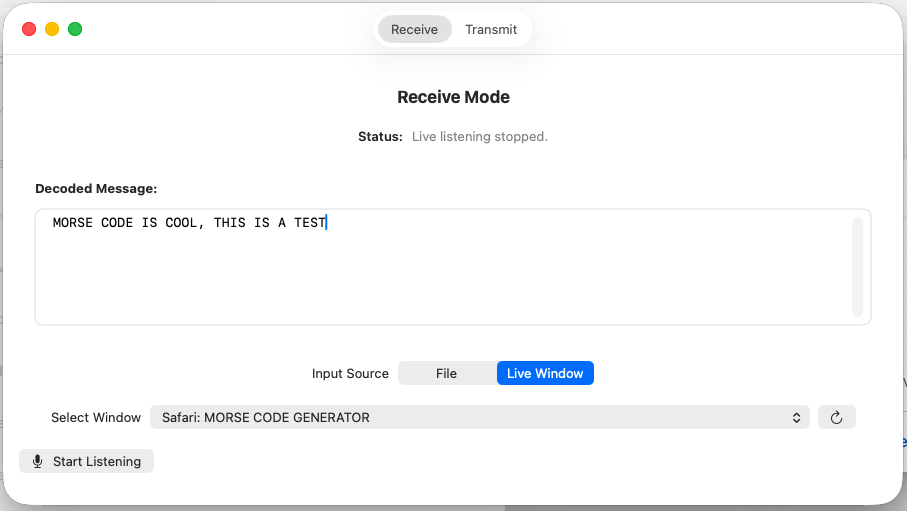
The core objective of the Receive mode is to decode Morse code from external software sources, such as an SDR application or a web browser running a YouTube video, without external hardware.
- Live Window Capture: Users select a specific target application (e.g., “Google Chrome” or “CubicSDR”) from a dropdown. The system isolates audio from that window, silencing all other system sounds to ensure a clean signal.
- File Analysis: For offline analysis, users can load standard
.wavfiles. The application scans the file, estimates the sender’s speed (WPM), and provides a full text decode. - Visual Feedback: As characters are detected and decoded, they appear in real-time on the interface.
2. Transmit Mode (The Encoder)
CW Companion also functions as a broadcast-quality generator for training or content creation.
- Text-to-CW: Users can convert typed text into standard International Morse Code audio.
- Export Capabilities: Beyond instant playback, the application allows users to export the generated audio to a
.wavfile, making it suitable for video production or over-the-air transmission.
Technical Architecture: Under the Hood
The technical power of CW Companion relies on a strict linear DSP (Digital Signal Processing) pipeline built on Swift 5 and modern macOS frameworks.
The Audio Capture Pipeline
Unlike legacy applications that tap into the microphone, CW Companion utilizes the ScreenCaptureKit framework (available on macOS 12.3+). The AudioCaptureManager requests an audio-only stream targeting a specific SCWindowID. This taps into the system audio buffer before it reaches the speakers, guaranteeing zero background noise such as typing sounds or room reverb.
Digital Signal Processing (DSP) Logic
Once the raw audio is captured, it passes through a custom processing chain defined in AudioProcessing.swift:
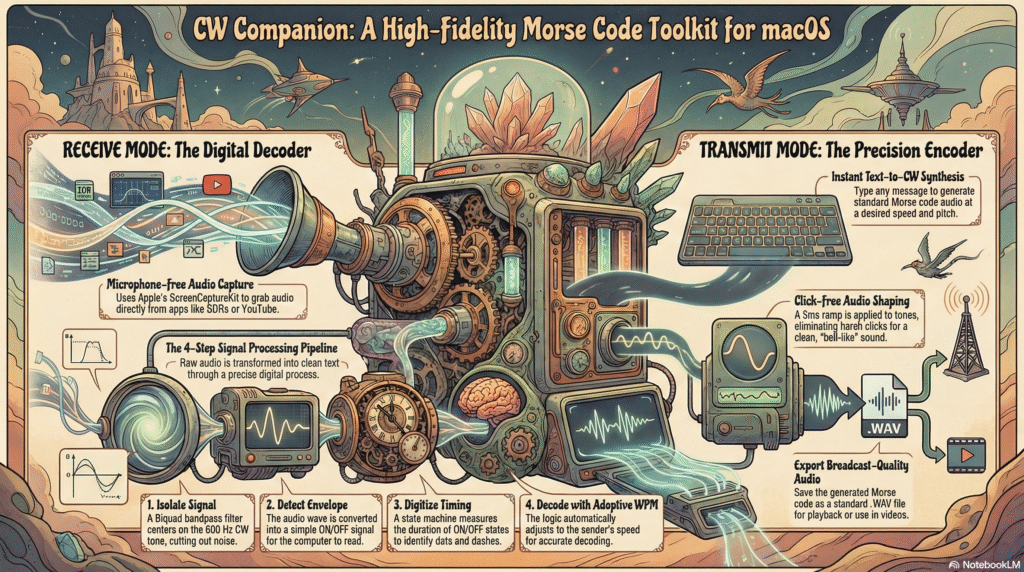
- Signal Pre-Processing (Biquad Filter): Raw system audio often contains broadband noise. To address this, the app implements a digital Biquad Bandpass Filter centered at 600 Hz with a Q-Factor of 5.0. This is sharp enough to isolate the CW tone but wide enough to catch slightly off-pitch signals.
- Envelope Detection: To convert the oscillating AC sine wave into a logic-friendly format, an Envelope Follower is applied. It uses a “Fast Attack” to capture the start of a dot instantly and a calculated “Slow Decay” (5ms time constant) to smooth out the sine wave peaks into a steady loudness line.
- Digitization (Thresholding): The system converts the analog envelope into a digital stream of boolean events. If the envelope level exceeds 0.01, the signal is registered as High (ON); otherwise, it is Low (OFF).
The Decoding State Machine
The boolean stream is fed into a streaming decoder that tracks state duration. It utilizes standard timing logic where a Dot is 1 unit, a Dash is 3 units, and a Word Space is 7 units. Crucially, the decoder features Adaptive WPM, allowing it to adjust its internal timing reference dynamically based on the speed of the incoming signal.
Audio Synthesis and Shaping
For transmission, the application generates a standard 600Hz sine wave. To prevent “Key Clicks” (harsh spectral splatter caused by instant on/off switching), the engine applies Envelope Shaping. A 5ms linear ramp is applied to the attack and release of every tone, resulting in a pleasing, bell-like quality.
Technology Stack
- Language: Swift 5.0.
- UI Framework: SwiftUI with reactive patterns.
- Audio Engine: AVFoundation (
AVAudioPCMBuffer) and ScreenCaptureKit. - Concurrency: Utilizes Swift structured concurrency (async/await) for stream management and Combine pipelines to offload DSP tasks from the main UI thread.