
In Part 4, we bridged the gap between our dynamic UI rendering loop and our headless Node-RED backend by implementing isolated ActionTopics, targeted PanelUpdates, and a dedicated execution processor. Our terminal console dashboard was finally fully interactive, firing off backend commands without breaking the beautiful, live Spectre.Console UI.
But what if we aren’t at our terminal? What if we want that exact same “Qubit BBS” dashboard experience—dynamically orchestrated via Pi Calculus—but available in a web browser from anywhere?
In this fifth installment, we evolved our single-client console application into a versatile multi-client ecosystem. We decoupled our core logic into a reusable Pi.Shared library, launched a brand-new .NET 10 Blazor WebAssembly client (pi-wasm), and implemented “Targeted Handshakes” to route custom UI configs to multiple active clients simultaneously.
The Pi.Shared Core Library
To support multiple UI frontends without duplicating our complex orchestration and MQTT logic, the first step was a major architectural refactor.
We created a new .NET 10 Class Library called Pi.Shared. Into this library, we migrated:
- The core data
Models(MenuItem,UiConfigData, etc.) - The MqttService responsible for backend communication
- The DynamicUiOrchestratorService responsible for handling the Pi Calculus handshakes and session states
To decouple the orchestrator from Spectre.Console directly, we introduced an
IUiService interface containing abstractions like UpdatePanel and UpdateMenu. Now, our backend logic simply calls _uiService.UpdatePanel(), completely agnostic to whether those pixels are rendering in a native terminal or a web browser.
Enter pi-wasm: The Blazor WebAssembly Client
With our core engine safely abstracted, we generated a new .NET 10 Blazor WebAssembly standalone project: pi-wasm.
Implementing the new client was incredibly straightforward. We simply added a project reference to Pi.Shared and implemented
IUiService inside a new BlazorUiService class.
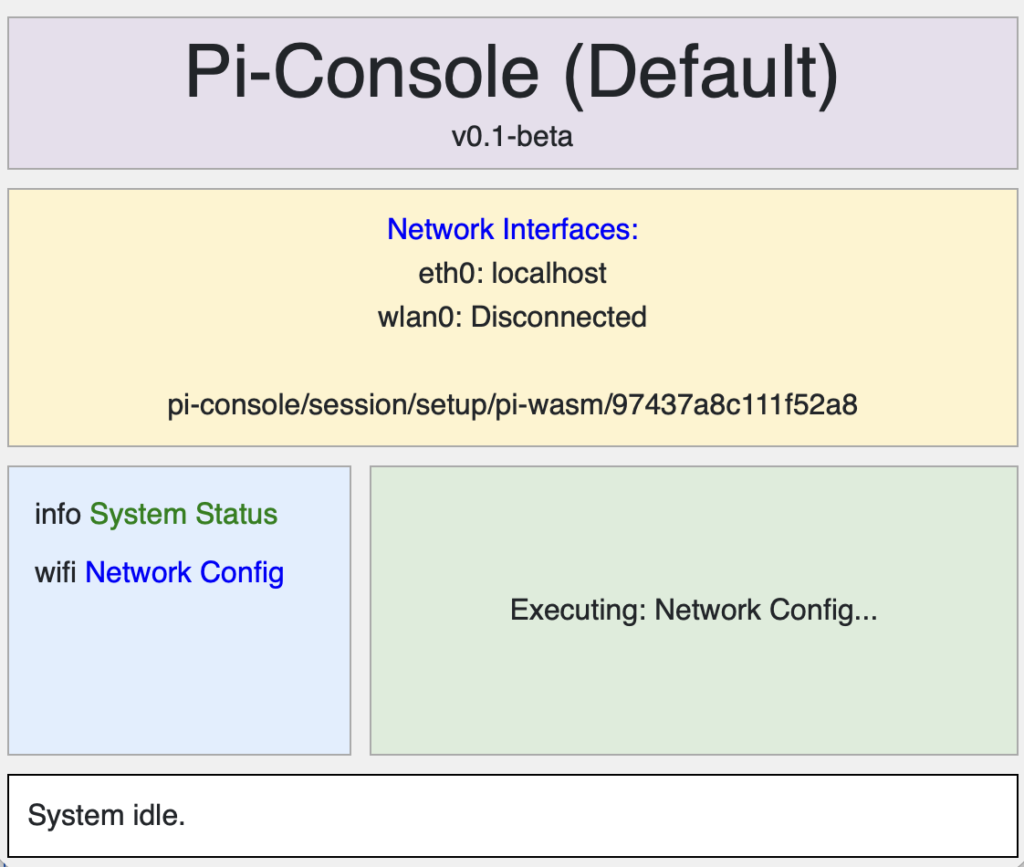
Instead of writing out CLI blocks, the Blazor UI binds strongly-typed component state directly to CSS Grid elements, maintaining the exact visual layout of our original “Qubit BBS” mockup (Header, Operations Menu, Output, and Status panels).
Translating Spectre.Console to HTML
One unique challenge: Our Node-RED responses and orchestrator states were heavily utilizing Spectre.Console markup tags like [green]ONLINE[/] to inject colors into the text stream.
To keep the backend blissfully unaware of the frontend rendering engine, we built a lightweight regex-based
SpectreConsoleParser in the WASM app. It seamlessly intercepts incoming Spectre tags and translates them into HTML <span> elements with inline CSS coloring. The parsed string is then injected into the UI via Blazor’s MarkupString, giving our browser UI the exact same color profiles as the CLI.
Bypassing TCP Ghosts with WebSockets
During testing, we encountered the “Tale of Two Brokers”. Our browser-based pi-wasm client securely connected to the Docker Mosquitto instance via WebSockets (localhost:9001) and instantly fetched the default menus. However, our native Mac pi-console application was randomly dropping packets over the standard TCP port (1883).
It turned out the host OS had a standalone TCP broker intercepting traffic, preventing packets from crossing the Docker network bridge!
The solution? We standardized both clients to connect explicitly over MQTT via WebSockets to bypass the native network conflicts.
Targeted Handshakes
With both pi-console AND pi-wasm successfully connected to the same Node-RED backend simultaneously, we faced our final Pi Calculus challenge: How do we send a different UI configuration to the Console app vs the Browser app?
We achieved this by implementing Targeted Handshakes.
- During MqttService initialization in Program.cs, each client is statically assigned a unique
ClientId(e.g.,"pi-console"or"pi-wasm"). - When announcing their presence on startup (
pi-console/client/startup), clients now include their ID in the JSON payload:{"clientId": "pi-console"}. - Node-RED parses this ID and dynamically routes the ensuing Pi Calculus handshake to a specific targeted listener:
pi-console/handshake/{clientId}. - Node-RED then looks up the
clientIdagainst a dictionary in pi-console-configs.json and pushes the tailored UI layout parameters and menu options down the secure session channel.
Thanks to this targeted routing, our Node-RED backend can serve entirely different, customized dashboards to different clients—all utilizing the exact same shared .NET 10 orchestration engine!
Stay tuned as we continue to push the limits of dynamic MQTT UI orchestration!
Clone the pi-console Repo on GitHub and develop your own UI orchestrations (Node-RED flows in the Architecture file in the repo)
One thought on “Building a Dynamic Console UI with .NET 10, MQTT, and Node-RED – Part 5: Blazor WebAssembly, Shared Libraries, and Targeted Handshakes”