
In Part 3: Dynamic UI Configuration and Session Initialization, we solved the problem of aesthetic scalability by leveraging Pi Calculus concepts to automatically negotiate and transmit custom UI layouts via MQTT. Our terminal gracefully configures its own title, borders, and colors on the fly based directly on the Node-RED orchestrator’s commands.
But a beautiful interface is only half the battle. A console dashboard needs to be interactive. It needs to tell Node-RED when to execute physical operations, fetch server stats, or deploy code—and it needs to render the results of those actions instantly without freezing the active menu.
In this next phase of the project, we bridged the gap between our dynamic UI rendering loop and our headless Node-RED backend by implementing isolated ActionTopics, targeted PanelUpdates, and a dedicated execution processor.
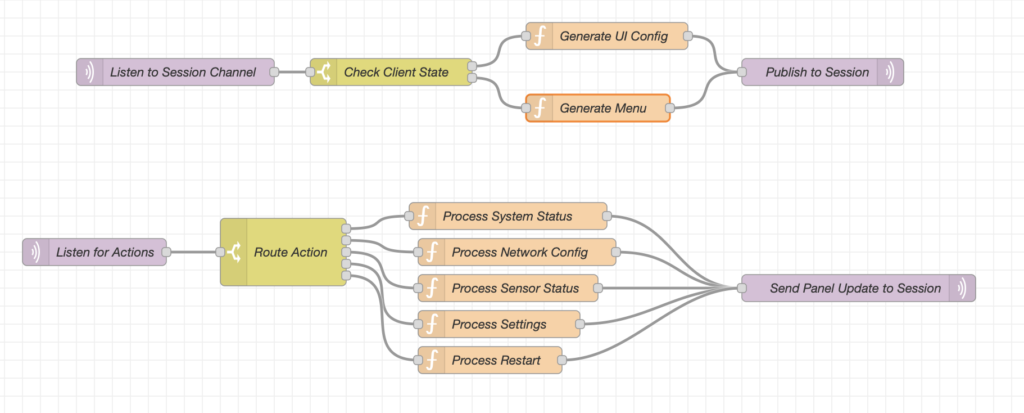
Triggering Actions: The actionTopic
Up until this point, our Spectre.Console terminal received a JSON array of MenuItem objects from the Pi session channel and drew them onto the screen. To make these items actionable, we appended two new fields to our MenuItem model: an icon string for fetching Unicode character art, and an actionTopic string (or action for shorthand).
When a user cursors down the list and hits Enter, pi-console no longer runs static C# logic. Instead, it captures the payload and offloads the request entirely:
var payload = new { sessionChannel = _currentSessionChannel };
var jsonPayload = System.Text.Json.JsonSerializer.Serialize(payload);
await _mqttService.PublishAsync(item.ActionTopic, jsonPayload);
By firing the trigger asynchronously on a background Task.Run hook, the console remains responsive. Notice the payload structure: we deliberately bundle the sessionChannel tracker into the MQTT message. Node-RED receives this trigger, parses the requested action via a Switch node, executes its logic, and uses that session string to route its response right back down the established Pi Calculus tunnel to our exact client instance!
Painting with Precision: Targeted PanelUpdate Responses
When Node-RED completes a task (such as polling system uptime or restarting a router), it replies to the session channel with a brand new message schema:
{
    "messageType": "PanelUpdate",
    "data": {
        "targetPanel": "outputPanel",
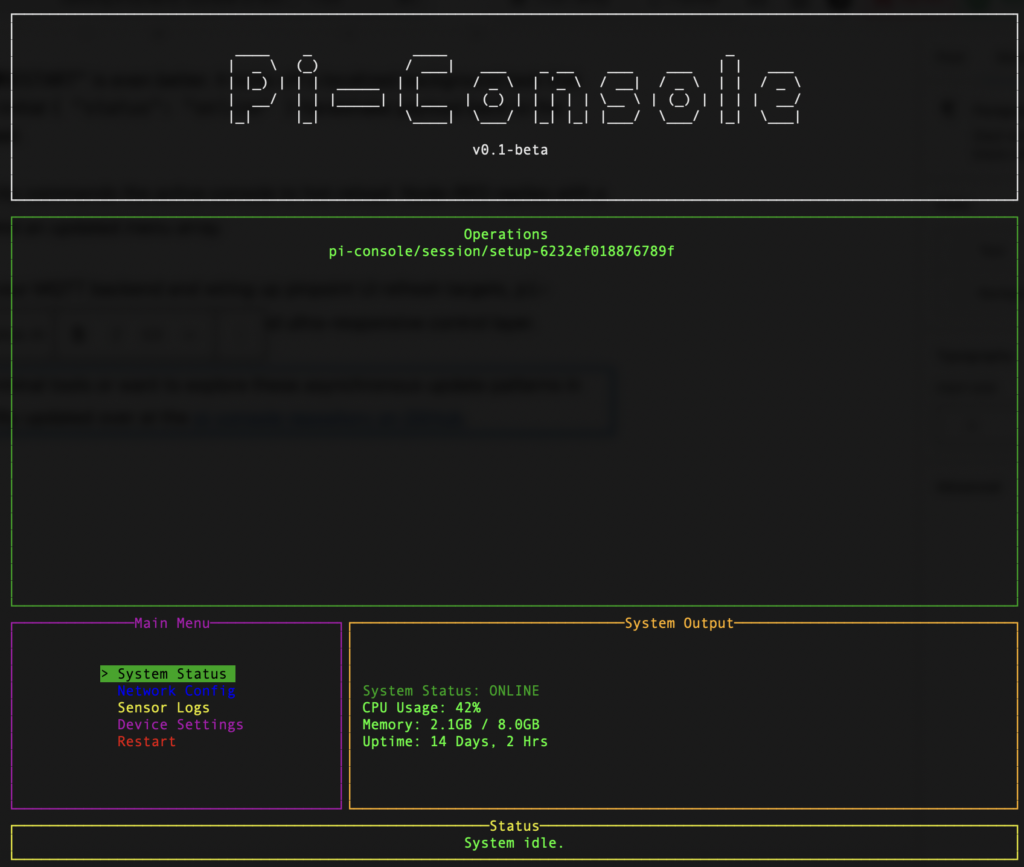
        "content": "[green]System Status: ONLINE[/]\nCPU Usage: 42%\nMemory: 2.1GB / 8.0GB"
    }
}
The orchestrator service intercepts PanelUpdate messages and deserializes the payload. But we faced an architecture hurdle. In a standard synchronous loop, updating a single panel requires re-rendering the entire screen. This would destroy the user’s active keyboard selection cursor in the Menu panel!
To solve this, we implemented thread-safe, localized refresh delegate hooks directly into our AnsiConsole.Live rendering engine inside Engine.cs:
_refreshOutput = () =>
{
layout[“Output”].Update(CreatePanel(“Output”, _lastOutputContent));
ctx.Refresh();
};
When the outputPanel or operationsPanel target is hit, the application updates only the specific localized string variable mapped to that panel, and fires the pinpoint refresh hook. The terminal seamlessly paints the newly computed data inside the box, allowing our dynamic Unicode-enriched menu array to continuously run undisturbed next to it.
The Invisible Engine: commandProcessor
Modifying visual elements dynamically is powerful, but what if Node-RED needs to interact directly with the C# application layer? We created a specialized, invisible target panel in our UpdatePanel evaluator named commandProcessor.
Instead of drawing text to the screen, passing data to the commandProcessor triggers internal application states.
- Sending
"content": "EXIT"halts the_isRunningvariable loop and invokes a cleanEnvironment.Exit()command, allowing Node-RED to securely shut down any connected client terminal at will. - Sending
"content": "RESTART"is even better. It kicks off a localized background task that forcibly re-publishes the initial{ "status": "online" }handshake payload back to the public initialization channel.
The RESTART trigger essentially commands the active console to hot-reload. Node-RED replies with a fresh UI configuration block and an updated menu array.
By pushing all heavy lifting to our MQTT backend and wiring up pinpoint UI refresh targets, pi-console has evolved into an incredibly modular, stateless, and ultra-responsive control layer.
If you’re building your own terminal tools or want to explore these asynchronous update patterns in .NET, the full code is continually updated over at the pi-console repository on GitHub.

2 thoughts on “Building a Dynamic Console UI with .NET 10, MQTT, and Node-RED – Part 4: Dynamic Menu Actions and Thread-Safe UI Updates”