
In Part 2: The Pi Calculus Menu System, we explored how a mathematical model for concurrent systems—the Pi Calculus—could natively solve our channel mobility problem. By utilizing a “handshake” process on a public MQTT topic, our static console evolved into a dynamic node that negotiates its own private, isolated MQTT channels on the fly.
Part 4: Dynamic Menu Actions and Thread-Safe UI Updates
Originally, if pi-console caught a PROVIDE_MENU command over its public handshake broker, it would tunnel into a private session, reply with READY, receive its localized JSON array of MenuItem objects, and render them in isolation.
While dynamically patching isolated menus into a statically orchestrated dashboard was cool, it meant the entire layout (our panels, titles, and structural colors) inherently remained statically compiled into the .NET application. If a terminal in the garage needed a red border for its “Operations” screen, and the one in the living room needed a sleek blue layout with a customized header, we were out of luck.
It was time to fully embrace the Pi Calculus paradigm. We needed an orchestration protocol that didn’t just configure the menu, but negotiated and shipped the entire UI configuration.
Re-envisioning the Handshake: INITIATE_SESSION
To represent this broader orchestration role, the initial handshake payload action was upgraded from a narrow PROVIDE_MENU mandate to a robust INITIATE_SESSION sequence.
When pi-console boots and publishes its standard { "status": "online" } presence announcement, the Node-RED orchestration server replies to the pi-console/handshake topic with our new dynamic session payload:
{"action": "INITIATE_SESSION", "channel": "session_id_xyz123"}Just like in Part 2, the client immediately subscribes to this new private channel (session_id_xyz123), records it to its active Operations tracker, and publishes a {"status": "READY"} payload natively into that localized tunnel. But what happens next fundamentally changes the flexibility of the entire dashboard.
Shaping the Screen: Dynamic UiConfig
Before Node-RED delivers the final menu logic, it now drops an entirely new PiSessionMessage across the session channel with the messageType of UiConfig.
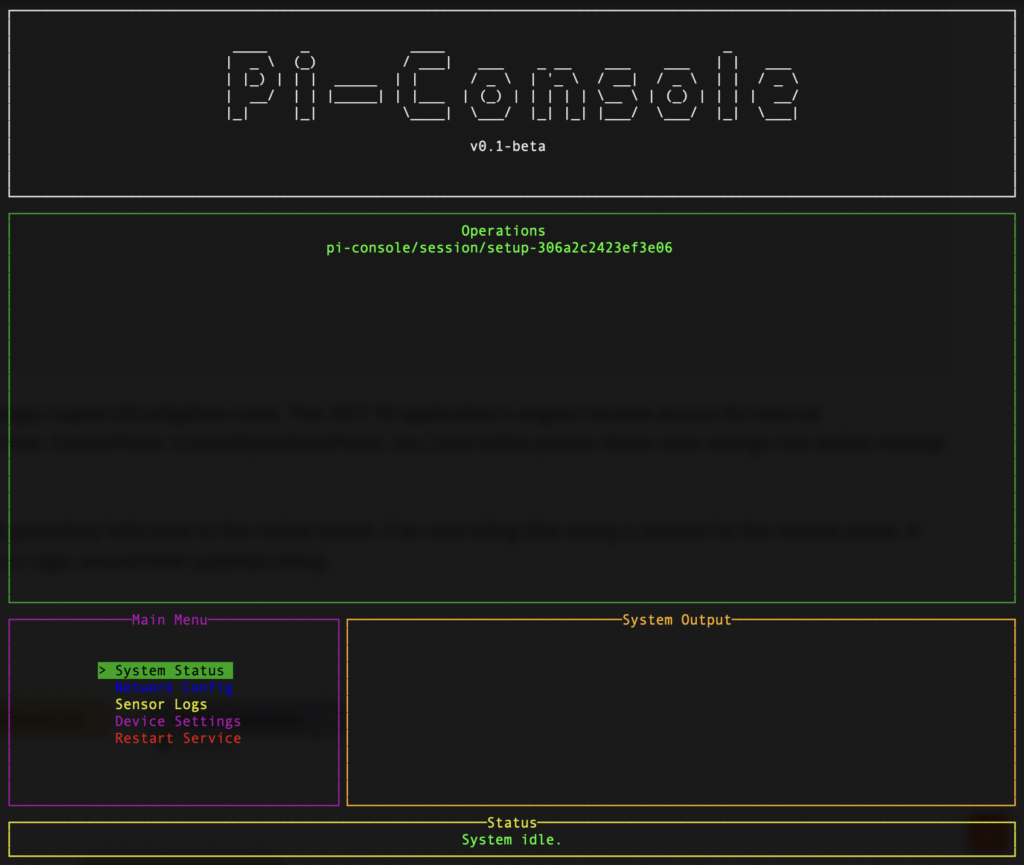
Because we decoupled the layout from the runtime logic, the orchestrator can inject customized title, borderColor, and titleColor parameters directly into every single structural panel of our Spectre.Console grid interface:
{
  "messageType": "UiConfig",
  "data": {
    "headerPanel": {
      "title": "GARAGE TERMINAL",
      "borderColor": "red",
      "titleColor": "white"
    },
    "menuPanel": {
      "title": "System Actions",
      "borderColor": "blue",
      "titleColor": "cyan"
    },
    "outputPanel": {
      "title": "Active Logs",
      "borderColor": "grey"
    }
  }
}
The pi-console client consumes this data into a strongly-typed UiConfigData class. The .NET 10 application’s engine iterates across its internal Spectre.Console Panel generation methods (CreateBanner, CreatePanel, CreateOperationsPanel, etc.) and safely parses these color strings into active markup block formats ([cyan]...[/]).
It evaluates everything securely. If a color is omitted, it gracefully falls back to the native layout. If an overriding title string is passed for the Header panel, it dynamically recalculates its beautiful ASCII FigletText logic around that updated string.
Finalizing the Node-RED Sequence
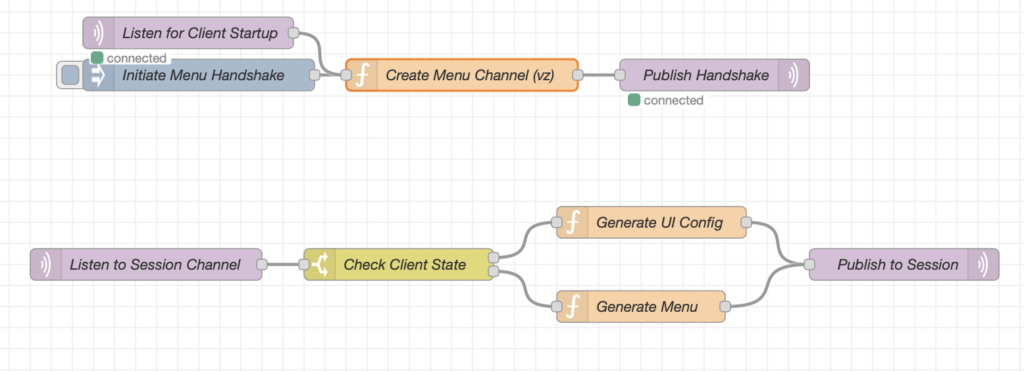
Armed with its new customized aesthetic framework, the .NET application re-renders the live console and immediately publishes a {"status": "UI_READY"} payload back to the session_id_xyz123 channel.
Node-RED catches this acknowledgment, and finally transmits the {"messageType": "Menu"} payload (the identical JSON array of MenuItem objects from Part 2). The application parses the command sequence, populates the System Actions panel it just drew for us, and awaits our keyboard input.
By abstracting away our hard-coded layouts into a localized, state-aware Pi Calculus handshake, pi-console has graduated into an entirely stateless thin-client. Whether it’s running in an industrial shed or a home office, it dynamically shapes its colors, titles, formatting, and operations identically to the specific topological needs of the session channel.
If you want to check out the updated C# MQTT JSON data structures or try extending the UiConfigData schema for yourself, grab the latest commits from the pi-console repo on GitHub.
One thought on “Building a Dynamic Console UI with .NET 10, MQTT, and Node-RED – Part 3: Dynamic UI Configuration and Session Initialization”